> For the complete documentation index, see [llms.txt](https://bleepy.gitbook.io/bleepy-developers/llms.txt). Markdown versions of documentation pages are available by appending `.md` to page URLs; this page is available as [Markdown](https://bleepy.gitbook.io/bleepy-developers/api/setting.md).
# API 설정
## 1. API 키 조회
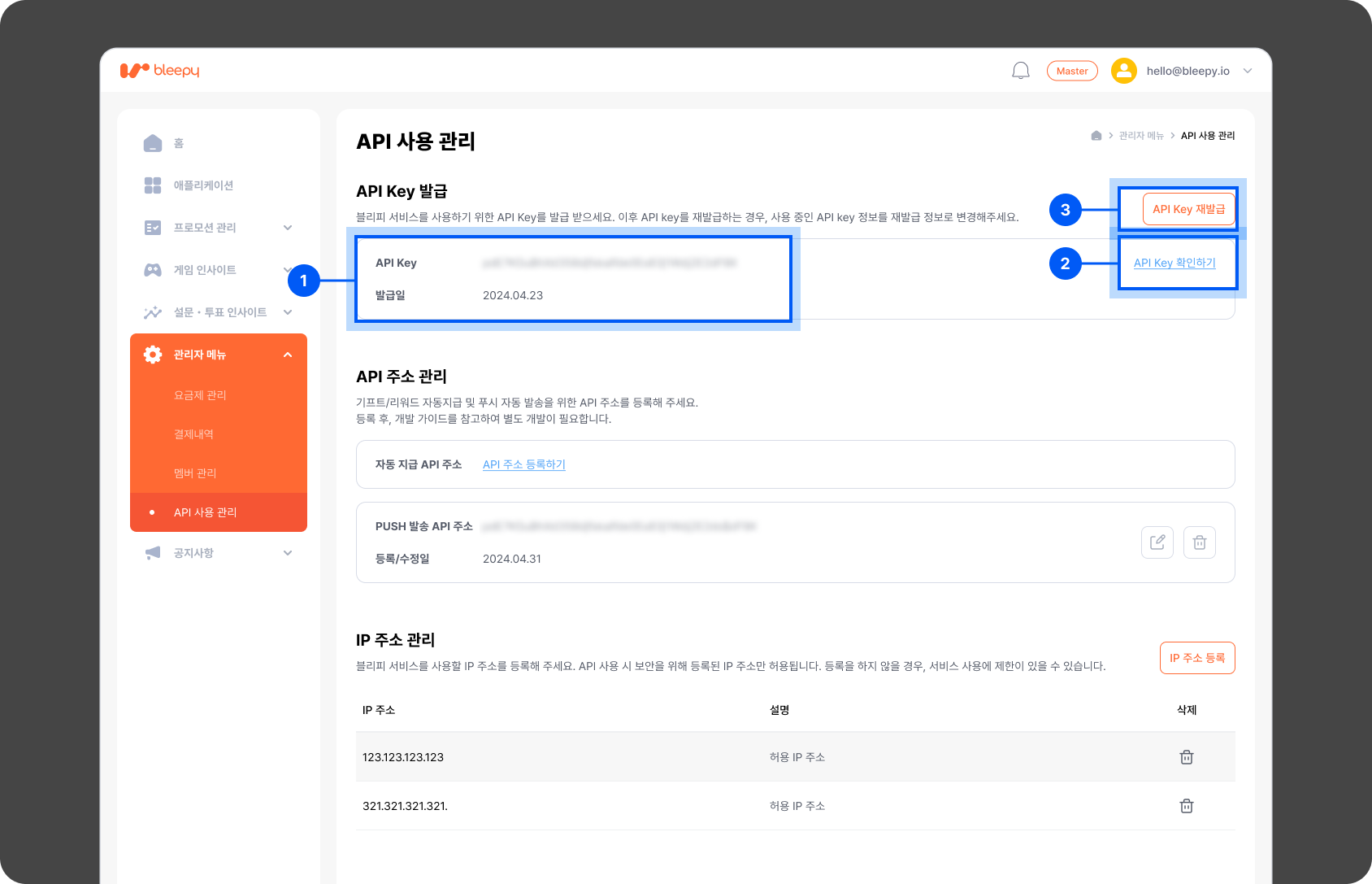
API 키는 [\[Client Admin\]](https://client-admin.bleepy.io/) 내 `[관리자 메뉴]` > `[API 사용 관리]` 페이지에서 조회와 재발급을 할 수 있습니다.
클라이언트 서버에서 블리피 서버로 요청을 보낼 때는 인증을 위하여 발급된 API 키를 `Header` 내 `API-Key``값으로 전달해야합니다.`
➀ 발급된 API 키 정보를 표시합니다. 보안을 위해 앞 3자리만 표시됩니다.
➁ API 키 확인하기 버튼을 클릭하면 API 키의 전체 정보를 확인할 수 있습니다.
➂ 새로운 API 키를 발급 받을 수 있습니다. 재발급을 진행할 경우 기존의 API 키는 블리피 서버 내에서 삭제되므로 꼭 요청 `Header` 내 `API-Key` 정보를 재 발급된 정보로 변경해 주세요.
***
## 2. 고정 IP 정보 등록
클라이언트 측 서버에서 블리피 서버에 요청을 보내려면 자사 서버의 고정 IP 정보가 필요합니다.\
블리피는 보안 사고를 대비해 등록된 IP 정보로 들어오는 요청만 허용하고 있습니다.
➀ IP 주소 등록 버튼을 클릭하면 IP 주소 등록 팝업이 호출되어 정보를 입력할 수 있습니다.
➁ IP 주소 리스트에서 등록된 IP 주소를 조회하고 삭제할 수 있습니다.
***
## 3. API 주소 등록하기
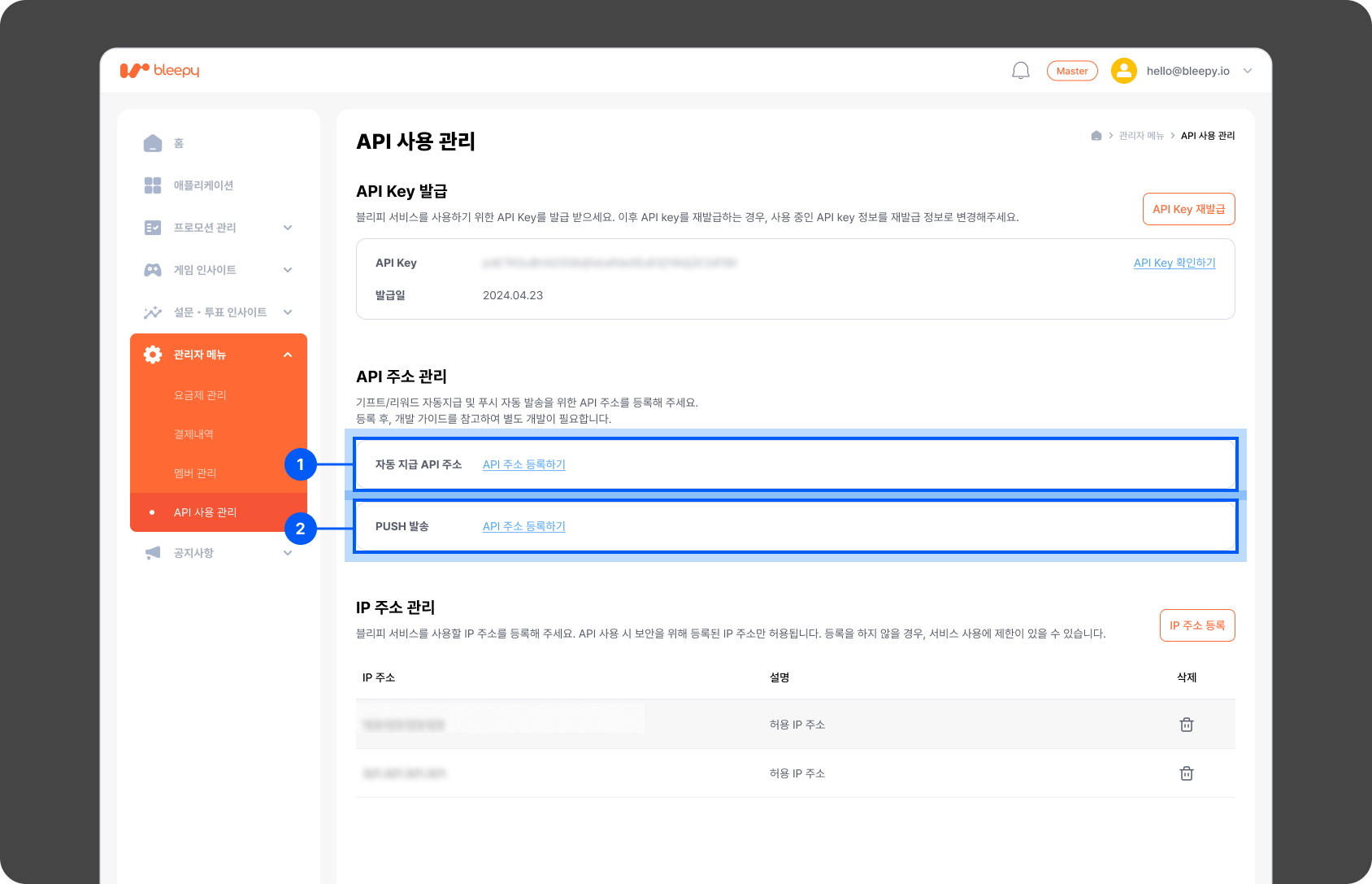
블리피에서 제공하는 자동 전송 기능을 사용하기 위한 API를 등록할 수 있습니다.
➀ 유저에게 기프트/리워드를 자동 지급하기 위해, `[자동 지급 API 주소]`를 등록할 수 있습니다.
* 자동 지급 API 등록 시, 기프트 또는 리워드 달성 시점에 지급 대상자 정보가 콜백됩니다.
* 이 때 지급 항목 데이터의 상태 처리도 자동으로 진행됩니다.
➁ PUSH 자동 발송 시점에 대상 유저 데이터를 수신하기 위해, `[PUSH 발송 API 주소]`를 등록할 수 있습니다.
* 육성게임의 경우 오전 10시/오후 2시 총 2번에 걸쳐 PUSH 자동 발송 대상자 정보가 콜백됩니다.
{% hint style="info" %}
개발에 대한 추가 설명이 더 필요하신가요?
"[\[Client Admin\]](https://client-admin.bleepy.io/login) 로그인 → 오른쪽 하단 채널톡 위젯" 클릭 후 개발 카테고리에 문의 남겨주시면 기술 개발팀에서 확인 후 연락드리겠습니다.
{% endhint %}