# 사전 확인사항

## 1. 런처 호출 URL이란?

<figure><img src="/files/UKBtaSm6qMI1OpaD4NxS" alt=""><figcaption></figcaption></figure>

자사 서비스 내 인앱 게임을 실행하기 위해서는 런처 호출 URL이 필요합니다.\
[<mark style="color:orange;">\[Client Admin\]</mark>](https://client-admin.bleepy.io/)에서 프로모션 생성 시 발급되는 <mark style="color:blue;">`secretKey`</mark> 값을 기반으로 WebView 또는 iframe 내 런처 호출 URL을 로드하여 게임을 실행해보세요. 생성된 UI 트리거로 유저는 서비스를 이탈하지 않고 게임을 진행할 수 있습니다.

### 1) secretKey 확인하기

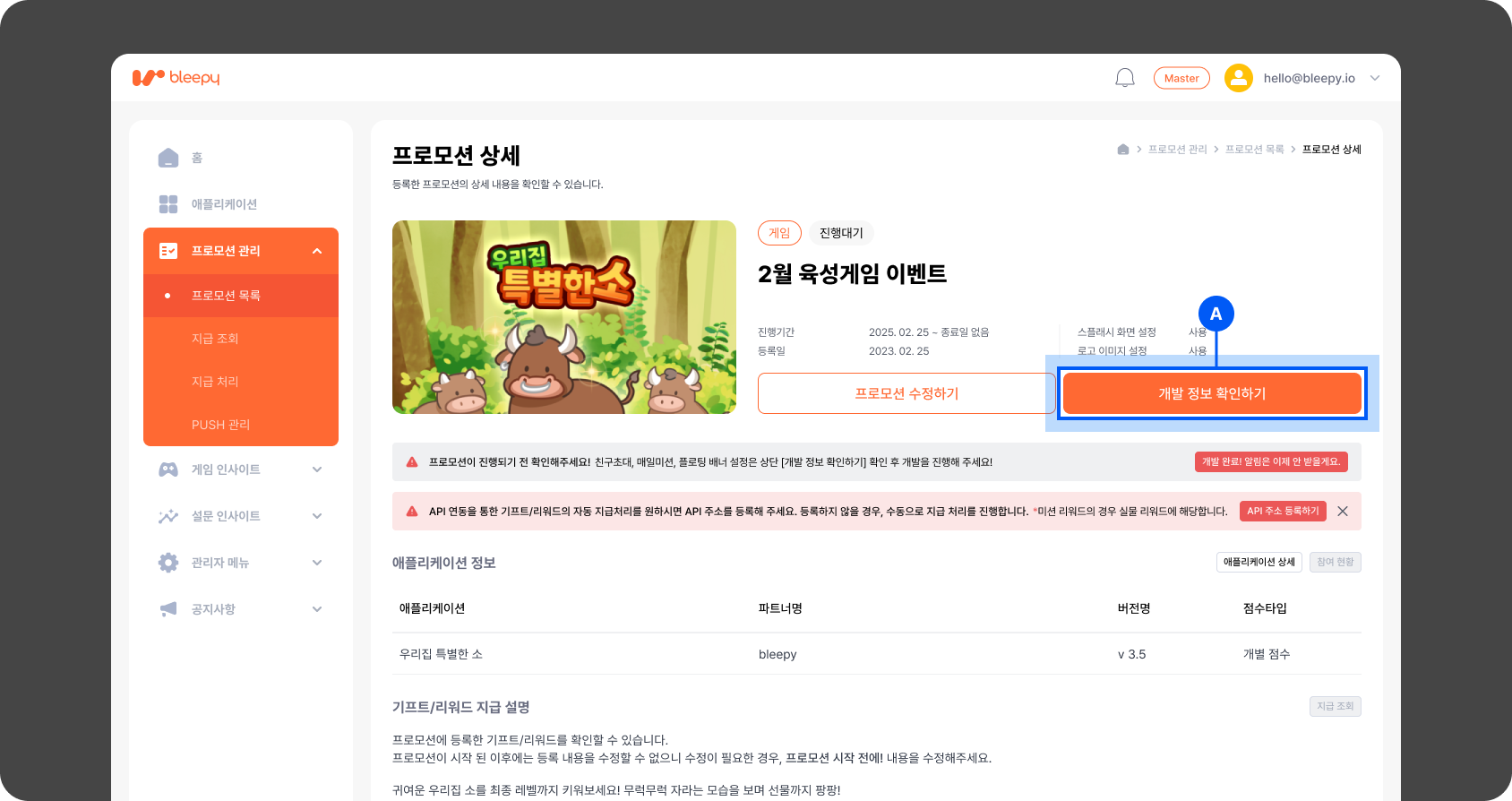
* [<mark style="color:orange;">\[Client Admin\]</mark>](https://client-admin.bleepy.io/) 내 <mark style="color:blue;">`[프로모션 관리]`</mark> > <mark style="color:blue;">`[프로모션 목록]`</mark>  > <mark style="color:blue;">`[프로모션 상세]`</mark> > <mark style="color:blue;">`[개발 정보 확인하기]`</mark> 팝업 내에서 <mark style="color:blue;">`secretKey`</mark> 정보를 확인하실 수 있습니다.

<figure><img src="/files/hgAFABz1d8UtYw9VGZw0" alt=""><figcaption></figcaption></figure>

<figure><img src="/files/RhZjhTaH0pnztscXxCEg" alt=""><figcaption></figcaption></figure>

Ⓐ 개발 정보 확인하기 : 프로모션 등록 후 프로모션 상세 페이지에 해당 버튼이 노출되며, 버튼 클릭 시 게임 임베디드에 필요한 정보들이 표시된 팝업창이 호출됩니다.

Ⓑ secretKey : 자사 서비스에서 게임을 임베디드 하실 때, 프로모션 정보와 연동되는 임의의 난수로 구성된 key입니다.

{% hint style="danger" %}
블리피에서 제공하는 Secret Key의 보안 관리에 대한 책임은 클라이언트에게 있습니다. 재발급은 불가능하므로 외부로 유출되지 않도록 주의하시길 바랍니다.&#x20;
{% endhint %}

### 2) queryString 규격 확인하기

런처 호출 URL은 필수값인 <mark style="color:blue;">`userKey`</mark> , <mark style="color:blue;">`secretKey`</mark> 로 기본 구성됩니다.

* **런처 호출 URL 기본 구조**
  * <mark style="color:blue;">https\://${런처URL}</mark>?userKey=${<mark style="color:orange;">userKey</mark>}\&secretKey=${<mark style="color:orange;">secretKey</mark>}

그 외 부가적인 옵션 값들은 queryString 형태로 전달이 가능하며, 아래 표를 참고하시어 필요한 옵션 값을 적절하게 사용해보세요.

{% hint style="info" %}
queryString이란?

사용자가 입력 데이터를 전달하는 방법중의 하나로, URL 주소에 미리 협의된 데이터를 파라미터를 통해 넘기는 것을 의미합니다.\
\
queryString 사용법

1. 정해진 URL 주소 이후에 <mark style="color:orange;">`?`</mark>를 쓰는것으로 queryString이 시작합니다.&#x20;
2. <mark style="color:orange;">`key=value`</mark> 형태로 필요한 파라미터의 값을 작성합니다.&#x20;
3. 여러개의 파라미터를 넘기고 싶은 경우 <mark style="color:orange;">`&`</mark> 를 사용하여 체인구조로 작성이 가능합니다.
   1. ex) <mark style="color:blue;">런처URL</mark><mark style="color:orange;">?key=${value1}\&key2=${value2}</mark>
      {% endhint %}

<table><thead><tr><th width="165">Key</th><th width="143">Required</th><th>Description</th></tr></thead><tbody><tr><td><mark style="color:orange;"><code>런처URL</code></mark></td><td>required</td><td>프로모션 상세 > 개발 정보 확인하기 팝업에서 확인 가능</td></tr><tr><td><mark style="color:orange;"><code>userKey</code></mark></td><td>required</td><td><p>유저를 구분하는 유니크한 key값으로 클라이언트 개발자는 해당 값을 필수로 전달해야합니다. 이는 인사이트 집계의 기준값으로 적용됩니다.<br></p><p>⚠️ 주의</p><p>최대 255자까지 허용되며, 255자를 초과한 경우 게임 실행이 불가능합니다. 만약 255자를 초과한 값으로 런처URL이 세팅되면 실행불가 안내 팝업이 표시됩니다.</p></td></tr><tr><td><mark style="color:orange;"><code>secretKey</code></mark></td><td>required</td><td>프로모션마다 발급되는 유니크한 key값</td></tr><tr><td><mark style="color:orange;"><code>language</code></mark></td><td>optional</td><td><p></p><p>게임 내 기본 언어는 가입된 사업자 국가를 따르지만 강제로 변경을 원할 때 해당 옵션 값을 사용합니다.</p><ul><li>ko (default)</li><li>en</li></ul></td></tr><tr><td><mark style="color:orange;"><code>platform</code></mark></td><td>optional</td><td><p></p><p>App 버전 연동 시 런처에서 개발 플랫폼 별 통신 방법 정의를 위한 옵션 값입니다.</p><ul><li>android (default)</li><li>ios</li><li>reactNative</li><li>flutter</li></ul><p>⚠️ 주의<br>App버전 연동 시 꼭 체크해주세요.</p></td></tr><tr><td><mark style="color:orange;"><code>signUpAt</code></mark></td><td>optional</td><td><p></p><p>친구 초대 미션을 사용하는 경우 필요한 내용입니다.</p><ul><li>신규 유저 판단을 위한 회원가입 일시를 전달해야 합니다.</li><li>timestamp 형식 (ex) 1717143687</li></ul></td></tr></tbody></table>

***

## 2. 딥링크란?

{% hint style="warning" %}
APP 기반의 서비스인 경우만 해당 내용을 참고해주세요.
{% endhint %}

<figure><img src="/files/87RJSTiOW3fCzmPijTgs" alt=""><figcaption></figcaption></figure>

자사 서비스 앱 내에서 원하는 화면으로 이동을 하기 위해서는 딥링크 설정이 필요합니다.

1. 서비스 중인 앱 내 <mark style="color:blue;">`scheme`</mark> , <mark style="color:blue;">`host`</mark> 관련된 처리가 되어 있는지 체크해주세요.
2. 인앱 게임 실행 중 유저를 특정화면으로 전환하려면 [<mark style="color:orange;">\[ClientAdmin\]</mark>](https://client-admin.bleepy.io/login) 에서  딥링크 형식으로 이동링크를 설정하세요.
3. 런처는 해당 딥링크를 호출하고 자사 서비스 앱은 이에 반응합니다.

이동링크 URL은 기본적인 딥링크 형태로 입력 되어야 하며 클라이언트 앱을 호출하게 됩니다.

```json
scheme://host?parameter1=value1&parameter2=value2…
```

<table><thead><tr><th width="161">Key</th><th width="155">Required</th><th>Description</th></tr></thead><tbody><tr><td><mark style="color:orange;"><code>scheme</code></mark></td><td>required</td><td><p>URI를 지정하기 위한 최소한의 필수 속성</p><p><span data-gb-custom-inline data-tag="emoji" data-code="26a0">⚠️</span> 클라이언트 앱에 따라 상이함</p><p>ex) bleepy</p></td></tr><tr><td><mark style="color:orange;"><code>host</code></mark></td><td>required</td><td>URI 권한의 호스트</td></tr><tr><td><mark style="color:orange;"><code>parameter</code></mark></td><td>optional</td><td>추가적인 정보를 전달할 때 queryString key 값</td></tr><tr><td><mark style="color:orange;"><code>value</code></mark></td><td>optional</td><td>추가적인 정보를 전달할 때 queryString value 값</td></tr></tbody></table>

{% hint style="info" %}
개발에 대한 추가 설명이 더 필요하신가요?

"[<mark style="color:orange;">\[Client Admin\]</mark>](https://client-admin.bleepy.io/login) 로그인 → 오른쪽 하단 채널톡 위젯" 클릭 후 개발 카테고리에 문의 남겨주시면 기술 개발팀에서 확인 후 연락드리겠습니다.
{% endhint %}


---

# Agent Instructions: Querying This Documentation

If you need additional information that is not directly available in this page, you can query the documentation dynamically by asking a question.

Perform an HTTP GET request on the current page URL with the `ask` query parameter:

```
GET https://bleepy.gitbook.io/bleepy-developers/game-promotion/pre-check.md?ask=<question>
```

The question should be specific, self-contained, and written in natural language.
The response will contain a direct answer to the question and relevant excerpts and sources from the documentation.

Use this mechanism when the answer is not explicitly present in the current page, you need clarification or additional context, or you want to retrieve related documentation sections.
